Digital workplaces, operational handoffs, and practical AI for health center teams. Explore recent work by Nickolas Spain across Infinite Solutions demonstrations and healthcare technology projects.
01 / FEATURED BUILDFictional portfolio demo · In progress
A connected health center. A clearer home for team knowledge.
An Infinite Solutions SharePoint demonstration that brings Medical, Dental, Behavioral Health, Outreach, and administrative resources into one workplace.
The build recreates the patterns of a multi-department organization using original fictional content. A registered hub, department pages, controlled libraries, and review resources make the architecture tangible.
Department homepages, Knowledge Centers, Review Centers, and governance pages provide a repeatable structure for staff resources.
Give documents structure.
Policy and Controlled Document types, nine metadata fields, and reusable templates support ownership and review dates.
Make review visible.
Selected libraries have verified approval, major and minor versions, and draft visibility settings. Fictional samples show the content model.
REAL SCREENS / FQHC & CLINICAL OPERATIONS
Step inside the digital workplace.
A 90-second narrated walkthrough of the Infinite Solutions SharePoint portfolio, with Medical, Dental, Behavioral Health, and Outreach examples.
Actual demo captures · Fictional content · AI voiceover & captions
The walkthrough shows published demo pages, fictional draft documents, configured metadata and library controls, and hub templates. Automated routing, reminders, and separate-person role acceptance remain pending in this demonstration.
Interactive SharePoint access is arranged by invitation and uses Microsoft sign-in.
Read the video transcript +
0:00
A digital workplace built around care.
A digital workplace, built around health center teams.
0:04
One starting point for shared work.
Start at one shared hub, with a clear path to departments, documents, and everyday resources.
0:11
A home for clinical knowledge.
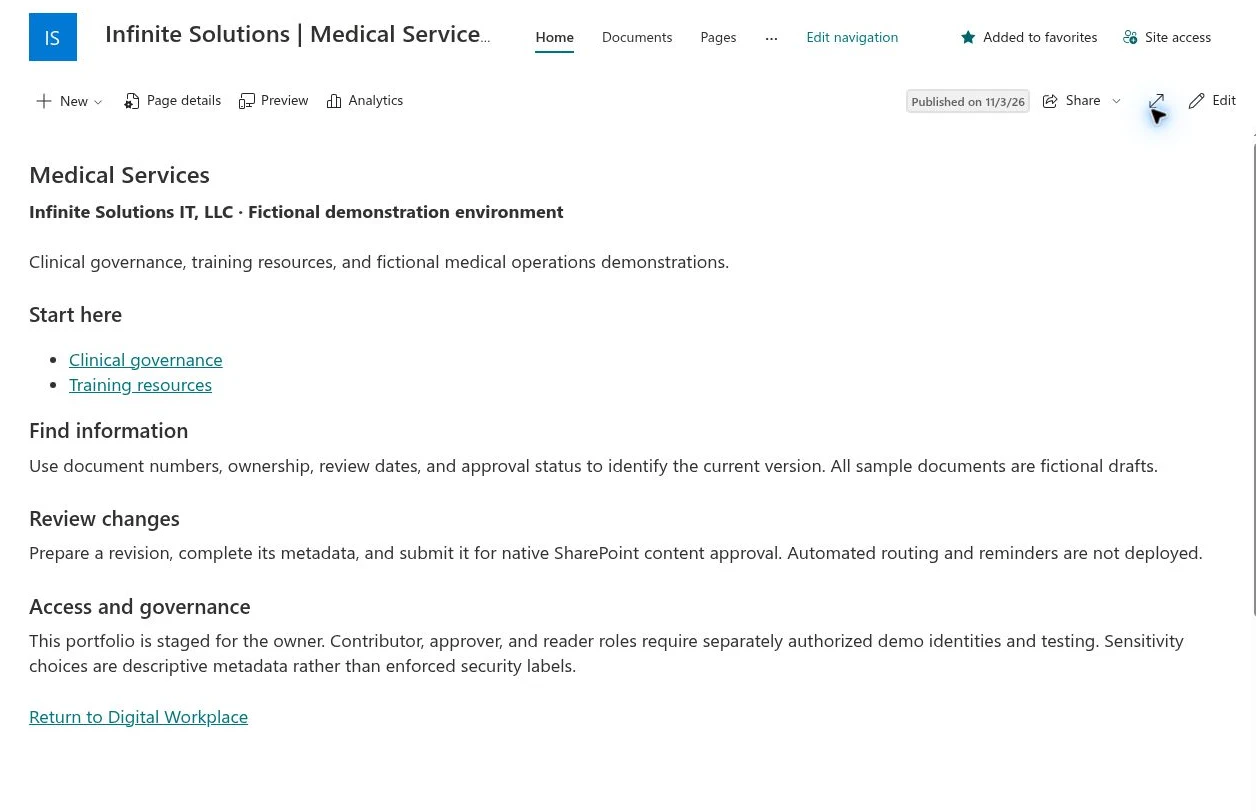
Medical Services brings clinical governance, training, and document guidance together, so teams have a clearer starting point.
0:20
Different services. A shared structure.
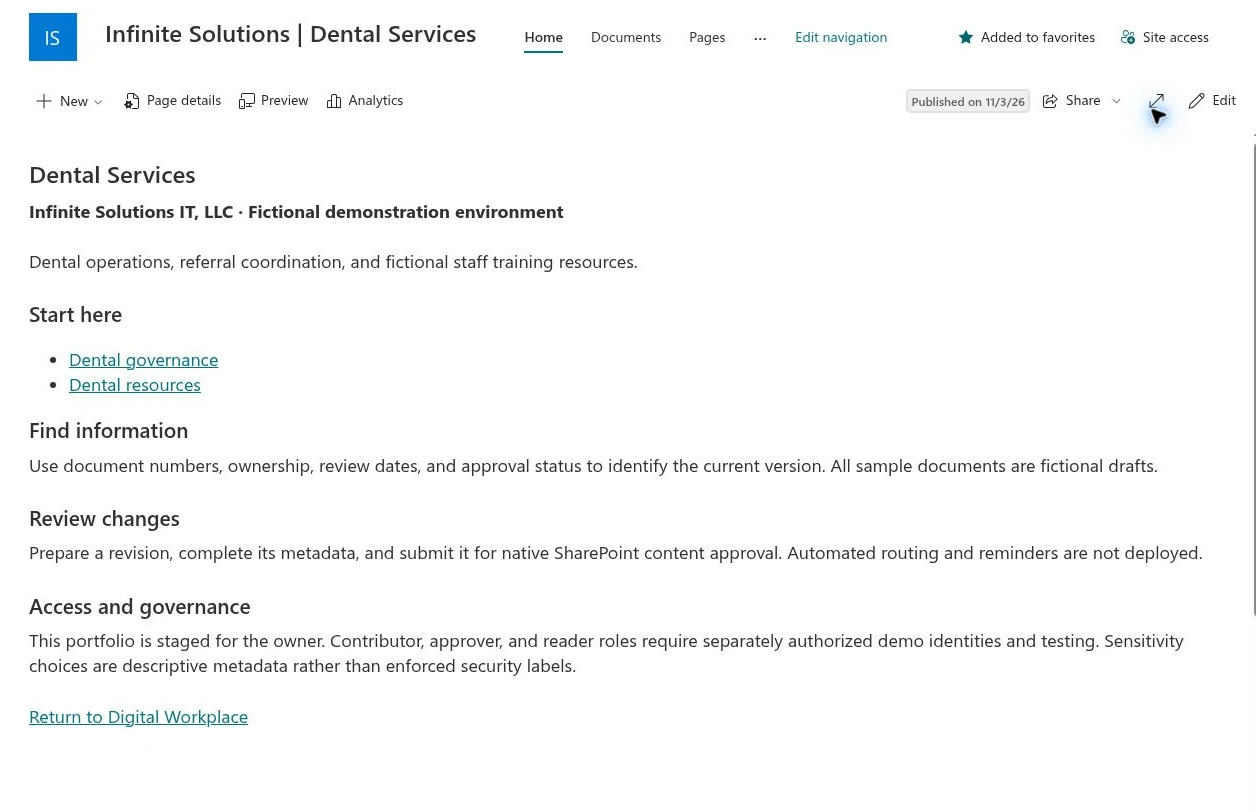
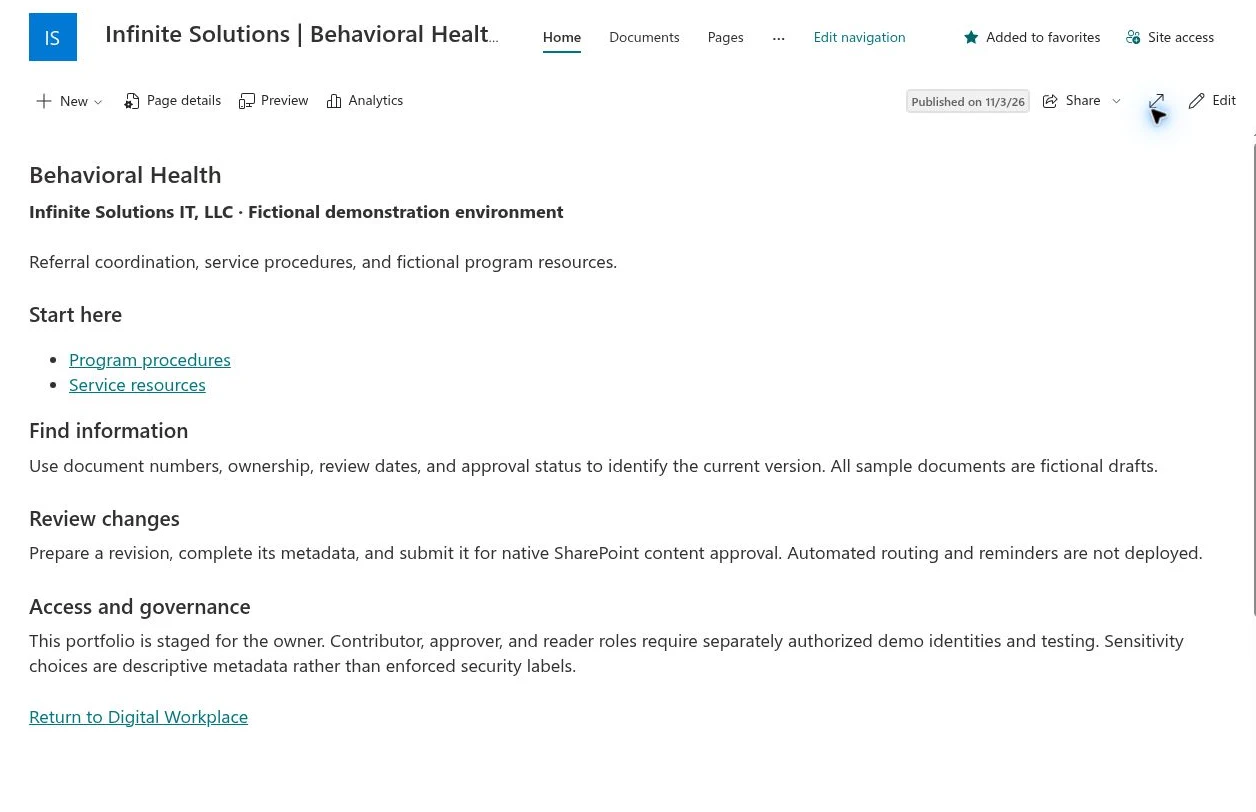
Dental and Behavioral Health each have their own resource areas, built on a familiar structure for finding and reviewing information.
0:29
Connect the work around access.
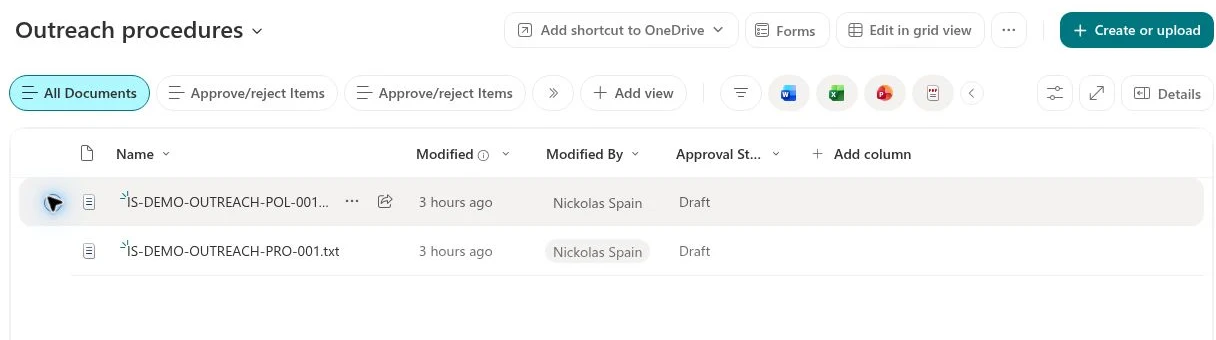
Outreach and Enrollment connects procedures and resources, with a simple route back to the hub.
0:36
Keep the document and its status together.
Inside the controlled library, document numbers and approval status stay alongside the files. These fictional policy and procedure samples remain in draft.
0:47
Give information an owner and a review cycle.
Two document types and nine metadata fields give information more context: its department, owner, document number, sensitivity, and review cycle.
0:58
Review before release.
Content approval, version history, and draft visibility are configured here. Testing with separate contributors, approvers, and readers is still to come.
1:08
Start from a consistent template.
Policy and Controlled Document templates give authors a consistent starting point.
1:15
Make the next responsibility clear.
The Medical Review Center explains each person's responsibility. Automated routing, reminders, and role testing remain next steps.
1:25
Your teams. Your processes. A clearer workplace.
Infinite Solutions IT. Let's build around your health center.
FROM THE INFINITE SOLUTIONS DEMONSTRATION
A closer look at the workspaces.
Real captures from the independently authored portfolio. Open an image to inspect the layout, or watch the guided overview.
Each project starts with a specific operational problem. Explore what has been built, its intended value, and the next acceptance milestone.
PROJECT 02 / CONCEPT IMAGE
02
HEALTHCARE OPERATIONS
Credentialing work, in one place.
A restricted workspace for roster reconciliation, follow-ups, and internal administrative review.
Limited pilot
Azure App ServiceSharePointPower Automate
Explore the build +
The problem
Credentialing follow-ups are difficult to track when source lists, notes, and review requests live in separate places.
What has been built
A hosted application with organizational sign-in and SharePoint-backed operational records.
Operator updates, submission for internal review, and an approval or return path.
AI assistance, weekday reminder digests, and submission notifications.
Why it matters
Give the operator a shared work queue and the reviewer a clear handoff, with a record of what needs attention.
Current stage & next milestone
Operator and reviewer account testing, source reconciliation, and scheduled-delivery acceptance. Administrative review remains separate from clinical privileging and payer enrollment.
PROJECT 03 / CONCEPT IMAGE
03
FINANCE AUTOMATION
From receipts to a clear handoff.
A Microsoft reimbursement workflow connecting employee submissions, supervisor review, and Finance payment handling.
Intake live · acceptance in progress
Microsoft FormsPower AutomateSharePointMicrosoft 365 directory
Explore the build +
The problem
A reimbursement request needs complete expense details, receipts, the right supervisor, and a traceable path to Finance.
What has been built
Organization-only intake supporting up to ten expenses and supporting receipt uploads.
Structured SharePoint tracking, accounting classifications, and historical-request reconciliation.
Directory-manager routing for supervisor approval, with Finance handling payment afterward.
Why it matters
Keep the request, supporting information, and decision history together through the approval and payment handoff.
Current stage & next milestone
Complete a direct-supervisor approval and Finance first-use walkthrough with the intended accounts. Finance payment handling is separate from supervisor approval.
PROJECT 04 / CONCEPT IMAGE
04
BUSINESS WORKFLOWS
Better requests. Clearer purchasing.
A structured purchase-request build for item details, review routing, and a documented purchasing handoff.
Built · controlled testing
Microsoft FormsPower AutomateSharePointExcel
Explore the build +
The problem
Purchasing teams need a complete request and a visible review history before they place an order.
What has been built
One-vendor requests with multiple items, quantities, prices, and product links.
Configurable supervisor, spending-threshold, and technology-review paths.
SharePoint tracking, a purchase register, and recorded approval history.
Why it matters
Make purchasing requests easier to review and hand off with the details already assembled.
Current stage & next milestone
Confirm the purchasing-system handoff, production roles, and full operating cycle with the business owners.
PROJECT 05 / CONCEPT IMAGE
05
HEALTHCARE OPERATIONS
A clearer view of vaccine operations.
A hosted workspace for inventory review, cold-chain evidence, source-quality issues, and audit-preparation tasks.
Hosted pilot · data validation
Azure App ServiceSharePointAI assistance
Explore the build +
The problem
Inventory exports, storage evidence, and follow-up actions need a shared review process across locations.
What has been built
A vaccine operations application and AI-assisted questions over the project workspace.
Shared registers, source-review tasks, and supporting evidence locations.
A separate, labeled demonstration using sample data.
Why it matters
Bring review tasks and supporting evidence into a more consistent operating workspace.
Current stage & next milestone
Reconcile operating inventory, validate staff access and temperature workflows, and obtain Medical acceptance. Live registry synchronization remains outside the demonstrated scope.
PROJECT 06 / CONCEPT IMAGE
06
VOICE AI
Emma, the AI receptionist.
An Azure-hosted voice project exploring conversational call handling and a handoff to a person.
Technical pilot
AzureVoice AIMicrosoft Teams
Explore the build +
The problem
A useful first response must understand why someone is calling and provide a reliable next step.
What has been built
Incoming-call handling, speech recognition, and spoken responses.
Multi-turn conversation and a Teams handoff path.
A release-candidate test suite and scripted call-acceptance scenarios.
Why it matters
Explore a repeatable front-desk experience with approved information and defined human escalation.
Current stage & next milestone
Verify live audio, interruptions, transfers, busy and no-answer recovery, and after-hours handling before a broader service release.
PROJECT 07 / CONCEPT IMAGE
07
LANGUAGE AI
Make the conversation easier.
A functioning English–Spanish development pilot with captions, spoken output, and a defined review path.
Development pilot
AzureSpeech & translationWeb application
Explore the build +
The problem
Routine bilingual exchanges need an accessible way to compare the original message and translated meaning.
What has been built
Back-and-forth conversation with speaker switching.
Original and translated captions, spoken output, and phrase translation.
Session clearing and a structured bilingual staff-testing packet.
Why it matters
Explore language assistance for a defined routine communication workflow with human review available.
Current stage & next milestone
Complete qualified bilingual testing and agree the permitted use. The current pilot uses synthetic scenarios; clinical and patient-facing use has not been accepted.
Project imagery is conceptual and summaries are generalized. Portfolio demonstrations use fictional or sample content. Guided walkthroughs are arranged around the appropriate demo environment.
SEE A FIT FOR YOUR ORGANIZATION?
Start with your process. Build something useful.
Bring a scattered document collection, a manual approval process, or a practical AI idea. We’ll help define the right scope and a way to test it with your team.

 PROJECT 02 / CONCEPT IMAGE