
Nonprofits & community organizations / MICROSOFT-FOCUSED IT

More clarity for your team. More room for your mission.

Give staff, program teams, and volunteers a more manageable technology foundation. Start with the accounts, shared resources, and recurring administrative work that keep your organization moving.

A light-filled workspace with silver computers, pale oak furniture, and cobalt accents.FOUNDER-LED DELIVERY / DEFINED SCOPE / CLEAR OWNERSHIP
BEGIN WITH THE PEOPLE & THE PROCESS

Make the operating model manageable.

A program lead may be responsible for a shared library while an administrator handles staff setup and purchasing. Technology works better when those responsibilities are explicit. Review the current environment, choose a useful first project, and leave guidance the people maintaining it can follow. Licensing, subscriptions, support, and project work should be visible in the scope.

PRACTICAL STARTING POINTS

Choose the work
that matters first.

Each starting point connects to a service that can be scoped around your environment, budget, and responsibilities.

01

Plan access around participation.

Define how employees, volunteers, and outside collaborators join and leave a program. Review Microsoft accounts and group membership, identify the resource owner, and document which access is temporary and which is ongoing.

Identity & access
02

Give program knowledge a home.

Arrange SharePoint resources around the way programs work. Use clear navigation, document owners, templates, and review guidance. A maintained source of information helps the next coordinator find what they need without starting over.

Team knowledge & SharePoint
03

Choose a useful administrative handoff.

Scope one request, review, or purchasing process with the staff who use it. Identify the submitter, reviewer, and person taking the next action. Test exceptions and leave a practical operating guide before expanding the workflow.

Business workflows
FROM THE INFINITE SOLUTIONS PORTFOLIO

Explore a connected organization in practice.

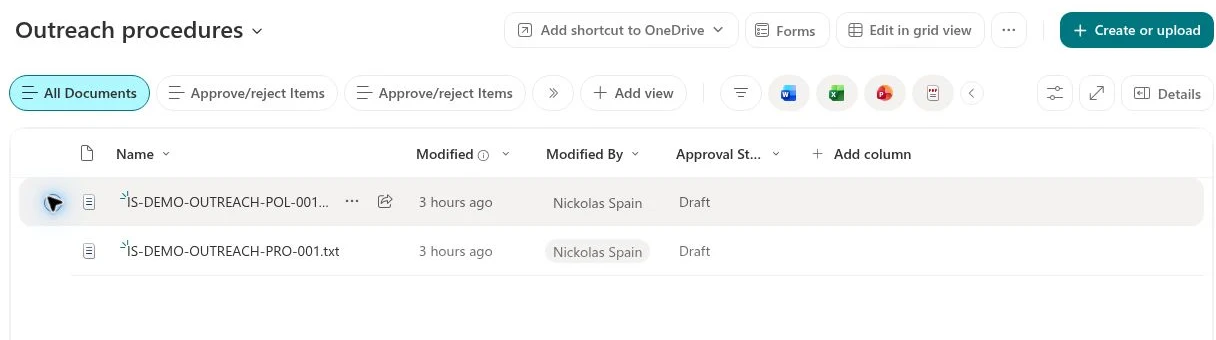
The fictional Digital Workplace portfolio includes department resources and an Outreach area. It demonstrates navigation, document structure, ownership, and reusable templates without relying on real program participant records.

Explore the digital workplace portfolio
Actual fictional document library in the Infinite Solutions SharePoint portfolio.
Actual portfolio capture · Fictional demonstration content
BEFORE WE BEGIN

Questions from
mission-driven teams.

A useful first conversation establishes what needs attention, who owns the work, and what a completed project should deliver.

Can you help us review Microsoft licensing?

A project can review your current subscriptions, assigned users, and requirements. Any nonprofit eligibility or offer must be confirmed with Microsoft or the relevant provider; licensing costs and project work are identified separately.

How can a limited budget shape the project?

Choose one recurring problem and agree the work, deliverables, subscriptions, and support responsibilities before implementation. A focused pilot lets the organization assess the result before planning a wider rollout.

Can staff and volunteers use different access?

Access can be designed around each person’s responsibilities and the resources they need. The project should identify who approves membership, when access ends, and how the organization checks that the design works.

Can our internal IT person stay involved?

Yes. Responsibilities can be divided between your internal team and Infinite Solutions. The operating handoff should make administration, support, documentation, and future changes clear to both parties.

EXPLORE ANOTHER SETTING
FQHCs & community clinicsBehavioral health & counselingProfessional services
YOUR NEXT CHAPTER

Let’s make technology
work for your team.

Bring the operational challenge. We’ll help define a clear next step.

Book a free consultationA real conversation. No pressure.