

Behavioral health & counseling / MICROSOFT-FOCUSED IT

Keep the practice connected. Keep the work clear.

Practical IT support for counseling practices and behavioral health teams, from staff accounts and shared inboxes to dependable workstations and a clearer home for operating resources.

A conceptual clinic workstation with a tablet, blank clipboard, and navy folder.FOUNDER-LED DELIVERY / DEFINED SCOPE / CLEAR OWNERSHIP
BEGIN WITH THE PEOPLE & THE PROCESS

Care delivery has a whole team behind it.

A clinician, receptionist, practice owner, and billing coordinator often need different information and different support. Begin with those responsibilities. Map how new staff receive access, who owns appointment and billing inboxes, and where the team finds current operating guidance. That gives a technology project a useful scope before configuration starts.

PRACTICAL STARTING POINTS

Choose the work
that matters first.

Each starting point connects to a service that can be scoped around your environment, budget, and responsibilities.

01

Give shared communication an owner.

Review appointment, billing, and general business inboxes alongside staff accounts. Define who can open each mailbox, who maintains membership, and what happens when a team member leaves. Document the handoff so it is repeatable.

Microsoft 365 support
02

Make staff setup repeatable.

Build an agreed approach to account creation, device setup, updates, and remote support. For shared workstations, identify how staff sign in and who maintains the device. Confirm what your practice needs before selecting management policies.

Device management
03

Put practice guidance in reach.

Organize operating procedures, staff resources, and document ownership in a team workspace. Connect the public website to your approved appointment route, while keeping internal staff resources behind the appropriate sign-in.

SharePoint workplaces
FROM THE INFINITE SOLUTIONS PORTFOLIO

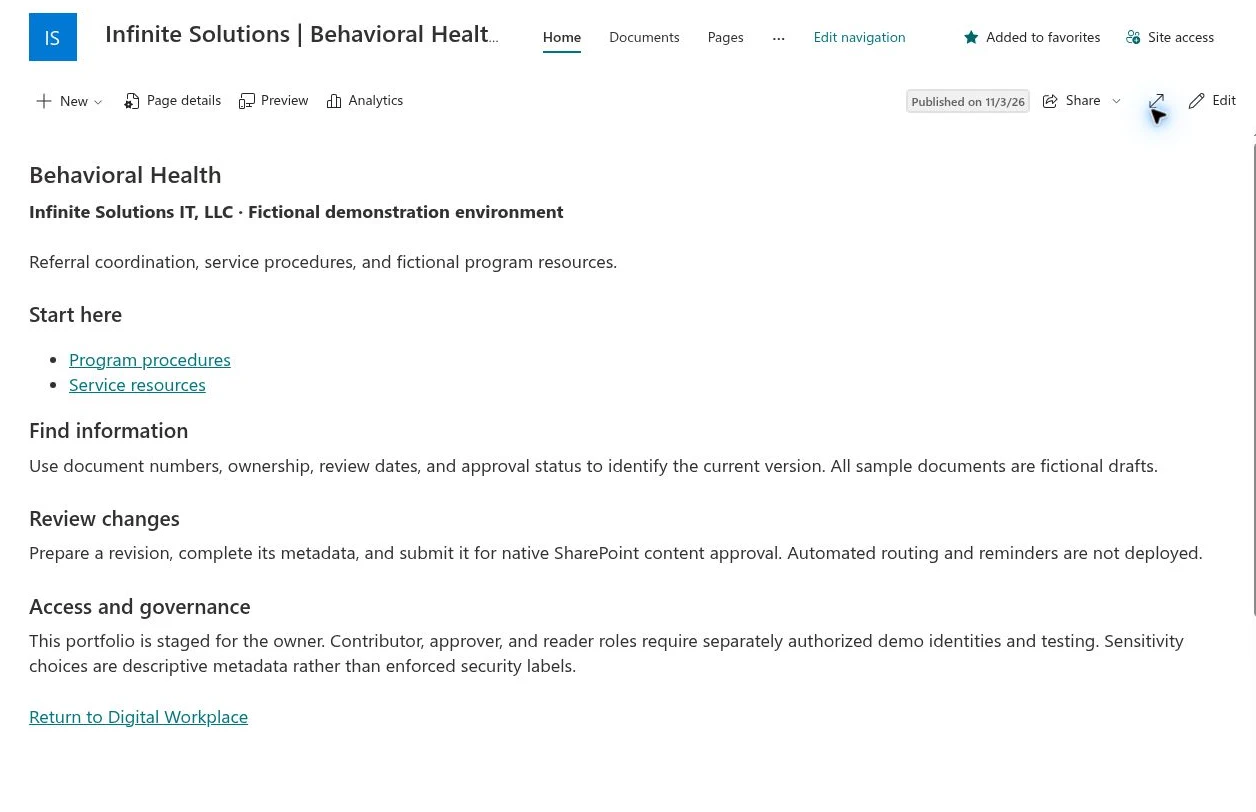
See the Behavioral Health workspace.

The fictional SharePoint demonstration includes a dedicated Behavioral Health area within a connected departmental structure. It illustrates an approach to staff knowledge and document guidance that can be adapted to a practice.

Explore the workspace examples
Actual fictional Behavioral Health SharePoint demonstration workspace.
Actual portfolio capture · Fictional demonstration content
BEFORE WE BEGIN

Questions from
practice teams.

A useful first conversation establishes what needs attention, who owns the work, and what a completed project should deliver.

Where would an IT review start for a counseling practice?

Start with the staff roster, Microsoft environment, devices, shared inboxes, and support arrangements. Agree which recurring problem to solve first, then define its owner, scope, and completion checks.

Can you work alongside our EHR or telehealth provider?

An engagement can include coordination on account, workstation, connectivity, or website handoffs. Your clinical platform provider retains responsibility for its application; the agreed scope identifies which party handles each issue.

Can a small practice begin with one project?

Yes. A mailbox review, staff setup guide, Microsoft 365 configuration project, or website improvement can be scoped separately. Ongoing support is discussed around your actual needs and available capacity.

How is a voice or translation pilot introduced?

Begin with a defined administrative use case, approved information, representative testing, and an escalation to a person. Decide what it may handle and how it will be reviewed before expanding its use.

EXPLORE ANOTHER SETTING
FQHCs & community clinicsNonprofits & community organizationsProfessional services
YOUR NEXT CHAPTER

Let’s make technology
work for your team.

Bring the operational challenge. We’ll help define a clear next step.

Book a free consultationA real conversation. No pressure.